illmob.org

WordPress Password Reset From Command Line

September 23rd, 2008 by Dev Team in News, Password Info

You just got WordPress installed and completely forgot to change the random password? To change it, open a terminal and change the password field for the account you just created in mysql.  Here’s how:
(more…)

Yahoo, Hotmail, Gmail all vulnerable to password-reset hack

September 22nd, 2008 by admin in Google, News, Password Info, Yahoo

How can you prevent a Palin webmail hack from happening to you? The short answer: you can’t.

Yahoo has no immediate plans to overhaul its e-mail security procedures after a hacker last week gained access to Sarah Palin’s private Yahoo Mail account, the company said Monday. Instead, it is reviewing security processes on an industry-wide basis.

Yahoo Mail isn’t the only Web-based mail service that could be duped into giving up someone else’s account password, the tactic that some have argued was used to break into Gov. Sarah Palin’s e-mail earlier this week.

Google Inc.’s Gmail, Microsoft Corp.’s Windows Live Hotmail and Yahoo Inc.’s Mail all rely on automated password-reset mechanisms that can be abused by anyone who knows the username associated with an account and an answer to a single security question, according to quick tests run by Computerworld.
(more…)

Free ‘Trojan-Proof’ Password Tool Released for Windows

September 22nd, 2008 by Dev Team in Files, News, Password Info, windows

A trio of German software firms claims to have developed a password system that prevents Trojans and viruses from stealing passwords from a Windows machine.

The “Trojan-proof” virtual keyboard software, which was developed by Global IP Telecommunications, PMC Ciphers, and CyProtect AG, is available in a free beta version for download.

“This development can make input of PIN codes and transaction numbers for online banking completely safe in the near future,” said C.B. Roellgen, creator of the password dialog and CTO of PMC Ciphers, in a statement.
(more…)

OphCrack Live CD – Crack Windows Passwords

September 20th, 2008 by Dev Team in News, Password Info, windows
Ophcrack LiveCD is a free bootable Windows password cracking CD based on rainbow tables. It is a very efficient implementation of rainbow tables done by the inventors of the method. It comes with a Graphical User Interface and runs on multiple platforms.

Features:
» Runs on Windows, Linux/Unix, Mac OS X, …
» Cracks LM and NTLM hashes.
» Free tables available for Windows XP and Vista.
» Brute-force module for simple passwords.
» LiveCD available to simplify the cracking.
» Loads hashes from encrypted SAM recovered from a Windows partition, Vista included.
(more…)

Create a Password Reset Disk

September 19th, 2008 by Dev Team in News, Password Info, windows

If you wanna backup your user password here is the best way:

For this you have to create a Password Reset Disk. If you are running WIndows XP Pro as a local user in a workgroup enviroment, you can create a password reset disk to logon to your computer when you forget the password. The way is depicted below:

* Click Start|click Control Panel and select User Accounts
* Click on your Account Name
* Under Related Tasks, click on Prevent a forgotten option
* Now follow the instruction in the wizard to create a password reset disk

Caution: Store this disk in a secure location as anyone can access your machine by this disk

How to reset your linux password

September 17th, 2008 by Dev Team in Linux, News, Password Info

This is a generic how to, working for all Linux distributions, not only for Ubuntu or Debian or Centos etc etc.

I see a lot of howto’s what are based on the same “story”: boot in “single mode” and type passwd to change the password, but are some systems like Debian and probably others what doesn’t let you get in single mode if you don’t know the root password … so the single mode solution it will not work.

First I will describe you the single mode solution, because the start of this solution is very similar with the next solution what I will present you in the end.
(more…)

Most popular Passwords

September 16th, 2008 by Dev Team in News, Password Info

common passwords
In the current publishing of August 2008, Government Computer News (GCN) lists the 10 most popular passwords. The source is the CTO of Advanced System Technology, Jon Kibler. Mr. Kibler analyzed the statistical distribution of passwords among 76,900 user accounts and found that 240 passwords were used more than once, while 35 had been used more than 3 times. 5 phrases were used more than 100 times.

The most popular passwords (Top 10) are:
Word / Count
123456 | 1,858 times
password | 1,482
passwd | 139 times
test | 129 times
test123 | 127 times
Blank (no password) 42 times
Admin | 29 times
root | 24 times
qwerty | 23 times
12345 | 23 times
Via: Government Computer News

Delete Internet Explorer 7’s browsing history, cookies and temporary files

September 16th, 2008 by Dev Team in News, Password Info, windows

From a command prompt or the run box, type:
RUNDLL32.EXE inetcpl.cpl,ClearMyTracksByProcess n

Where n can have the following values:

1 delete browsing history (list of visited sites)
2 delete all cookies
8 delete temporary files (cache)
16 delete all saved forms data
32 delete all saved passwords
255 delete all of the above
4351 delete all of the above and all settings stored by add-ons

Outlook Recover 1.0

September 15th, 2008 by Dev Team in News, Our Tools, Password Info, windows

When you create a mail account in Outlook Express or a POP3 account in Microsoft Outlook, and you choose the “Remember password” option in the account properties, the password is saved in the Protected Storage in the registry, and this utility can recover it.

The Protected Storage information is saved in a special location in the Registry. The base key of the Protected Storage is located under the following key: “HKEY_CURRENT_USER\Software\Microsoft\Protected Storage System Provider”
You can browse the above key in the Registry Editor (RegEdit), but you won’t be able to watch the passwords, because they are encrypted. Also, some passwords data are hidden by the operating system.
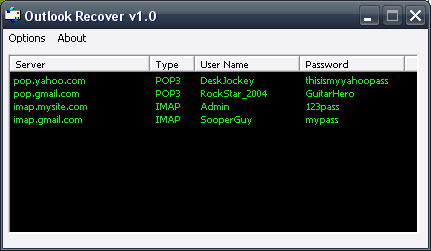
Outlook Recover

We are releasing a Demo version of Outlook Recover that recovers the first 3 characters of your password.

[smartcounter:9]

The full version is available for $2.99 that shows the complete password.

Built in pure Assembler language this program is only 7kb and fits perfectly on a thumbdrive to carry with you anywhere.

Help support this site by purchasing it ,so we can continue to build and maintain resources that is relied on by IT techs / people in all kinds of situations.

You can purchase through paypal or e-gold from the links below. Thank you.

Pay Now with e-gold...

Steam Password Recovery

September 8th, 2008 by admin in Gaming, News, Our Tools, Password Info

We are pleased to announce our newest program:
Steam Recover 1.0
Steam Recover

Which allows you to recover your username and password for your Steam login for Valve games locally from your computer.

This method works if the “Remember My Password” was selected before logging in. It also will work if you didn’t select “Remember My Password” but are currently logged into your Steam account.

We are releasing a Demo version of Steam Recover that recovers the first 3 characters of your password.

Built in pure Assembler language this program is only 8.5kb and fits perfectly on a thumbdrive to carry with you anywhere.

STEAM CHANGED THE WAY THEY SAVE THEIR PASSWORDS, PROGRAM NO LONGER WORKING

« Previous ArticleNext Article »