
Toshiba Laptop BIOS Recovery
Toshiba laptops aren’t like most laptops where you can remove the BIOS battery and let it sit for a few hours to reset the BIOS. So what do you do? There are three forms of BIOS password removal being used currently by Toshiba:
1. Parallel port wraparound connector
2. Shorting a jumper, with power and with no power
3. Challenge/Response code
Method 1. Printer Dongle Method:
Works with Portege, Satellite, Satellite Pro, Tecra and Libretto Laptops of the following model numbers :
100(1xx) 200(2xx) 300(3xx) 400(4xx) 500(5xx) 600(6xx) 700(7xx)
1000(1xxx) 2000(2xxx) 3000(3xxx) 4000(4xxx) 7000(7xxx) 8000(8xxx)
(A15-S 127) (1415-S 173) SERIES & Some DVD Models
The “xxx” above means that each x can be any number, i.e. 1xx could be 101, 103, 111, 112 etc.
* First cut a plug from an old DB25 printer cable, and open the casing of the plug. This is how the pins look:


* Now connect:
o Pin 1 to Pin 5 and to Pin 10 ( go from 1 to 5 and from 5 to 10)
o Pin 2 to 11
o Pin 3 to 17
o Pin 4 to 12
o Pin 6 to 16
o Pin 7 to 13
o Pin 8 to 14
o Pin 9 to 15
o Pin 18 to 25
It should look something like this:

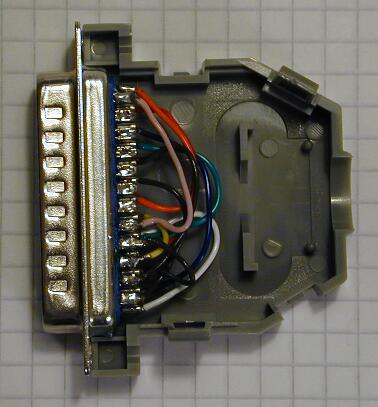
Plug it in and bootup
METHOD 2. Shorting a jumper:

In order to clear a BIOS of Compal manufactured units you need to use the NO POWER method, units manufactured by Inventec need to be to be POWERED ON to rest the BIOS.
To reset Compal units:
1. Turn off the POWER
2. Remove the battery and power cord
3. Peel back any black mylar (if any) covering the jumper
4. Using a flat screwdriver, short the jumper by connecting the two jumper points
5. Reset the computer and verify the BIOS has been reset, if not then repeat steps
Inventec units can skip steps 1 and 2
METHOD 3. Challenge/Response Code:

The challenge/response code method consists of matching a Challenge code ( power the machine up,press ctrl,then tab,then ctrl, then enter) generated on your machine and matching a Response code generated by Toshiba and calling a Toshiba Tech Support Agent.
added 5/31/10:
Satellite p100 and pro p100 : with laptop off,remove wifi card and short pads marked jp8 for 10 secs
satellite l10,l20,l30 and pro l20 : with laptop of short pads marked jp1 for 15 secs (l20 short pads marked g1)
satellite m100 and tecra a6 : with laptop off ,remove memory and insulation under memory and short pads marked clr1 for 15 secs
(satellite 17** series,1100,1110,1130, 1200, 1900, 2430, 3000 P20,P30, P33, A30, A70, A80, M40X, M50,M60, M70, M100)as above
tecra a3,s2,a5,a6 : pads are by memory modules and will be labeled J1, J2, J5, J7, J9 or clr1
satellite a100,tecra m7 : remove keyboard and short pads marked c88 while turning laptop on, remove short as soon as Toshiba logo appears
Satellite A100 (PSAA2A-02C01N) : Remove Memory Cover from base of machine
Release & remove right side Memory Module,Lift black plastic insulation
Locate & short PAD500 Pin 1 & 2 together,Power on machine while still shorting Pin 1 & 2
As soon as the TOSHIBA logo appears, remove short
TECRA A4 & Satellite M40
Open modem & Wi-Fi card cover,Remove mini PCI Wi-Fi card
Lift up black plastic,Locate & short C738 Pads 1 & 2 together
Power on machine while still shorting Pads 1 & 2
As soon as the TOSHIBA logo appears, remove short
tecra s1 : TECRA S1
Open palm rest cover,Remove mini PCI Wi-Fi card
Lift up black plastic,Locate & short C5071 Pin 1 & 2 together
Power on machine while still shorting Pin 1 & 2
As soon as the TOSHIBA logo appears, remove short
NOTE SOMETIMES THESE WILL TAKE A COUPLE OF TIMES TO WORK,BUT THEY WILL WORK.


on April 24th, 2009 at 7:24 am
i am going to assume it has something to do with the bridge battery? my fujitsu documentation says it has a “bridge battery” which is just a small internal battery that allows you to swap the main battery for a new one without powering down. i dont know all that much about it… but possibly this is what keeps the bios from clearing when the bios battery is pulled?
on June 22nd, 2009 at 10:15 pm
i have a toshiba satellite m30-s309 i need reset bios password any method work for me?
please someone helpme!
on July 1st, 2009 at 4:16 am
What’s My Pass? » Toshiba Laptop BIOS Recovery…
Toshiba laptops aren’t like most laptops where you can remove the BIOS battery and let it sit for a few hours to reset the BIOS. So what do you do? There are three forms of BIOS password removal being used currently by Toshiba…….
on July 30th, 2009 at 8:10 am
can you send me you programs and make me happy always!!!
on August 22nd, 2009 at 3:33 pm
i have a toshiba a105 s1014 and its locked at the bios need help reseting it or bypassing it. would appreciate the help thanks
on October 23rd, 2009 at 10:41 am
i have a laptop toshiba satellite pro s200 prob is bois password plz send me reset bios formula plz
on October 25th, 2009 at 2:45 am
is there any solution to find the response code by ourself ?
on October 27th, 2009 at 7:11 pm
Hello.
In your Toshiba laptop Bios reset dongle method http://www.whatsmypass.com/toshiba-laptop-bios-recovery. In your 1st and 2nd photo, the locations for pin #1 are in different location on the dongle. Please open the link and see what I’m talking about. Can you please confirm which one is correct before I solder and try. Please get back to me.
Thanks in advance,
RJ
on November 19th, 2009 at 2:49 pm
I have a Toshiba L305-s5919 and I need to reset the bois pw. Can anyone help me.
Thanks
on November 22nd, 2009 at 11:35 am
how to reset satellite pro 4380
because mine only display “ec/kbc is damage”
how to fix or repair it.
Hope solutions helpfully.
thanks
on November 25th, 2009 at 2:26 pm
rhett,
The first picture is the INSIDE of the plug, while the second is of the OUTSIDE of the plug. They are both correct, but from different perspectives.
Look at picture 3. Imagine picture 1 is looking at that from the top of picture 3 down( from inside the plug), while picture 2 is from the bottom up (outside of the plug).
When doing the wiring, use picture 1 as your reference.
-Martin
on January 5th, 2010 at 7:29 am
is there any Response Code Generater software available…
on January 22nd, 2010 at 5:17 am
Great articles & Nice a site
on February 21st, 2010 at 5:52 am
i want to remove bios password
on March 1st, 2010 at 6:11 pm
Hi Guys! has any one knows a code generator for Challenge Code / Response Code?
Thanks in advance!
on July 18th, 2010 at 1:28 am
Hi there, I have read on your site, and repeatedly on dozens of other sites as well, that shorting the clr1 for 15 seconds on the M60 will fix my now unuseable password (it worked fine before!) but once I remove the memory modules as described above there is absolutely NOTHING marked clr1 in that area. Has anyone found where to find the clr1 on an M60 specifically? I cannot find a single reference to it’s actual location anywhere on the net so far…
I shall bow before anyone who possesses and shares this obscure visual knowledge!!
on September 8th, 2010 at 2:05 pm
[…] Head over to WhatsMyPass.com to see more information about BIOS password recovery. // Bios, Password Leave a comment […]
on September 21st, 2010 at 8:08 am
I have a Portege 2000 (the very thin laptop) and I have this problem. The computer boots up but I am almost immediately given a “Password =” screen. I was hoping this would work but this laptop doesn’t have a printer port. I’ve spent hours looking for an answer. If anyone can help that would be great.
on October 28th, 2010 at 1:16 pm
I have a toshiba Satellite L20 laptop and I have tried to follow the above instructions.
I have powered off the laptop and removed the wireless card but I cannot find the solder pads relating to G1 anywhere. I have been over the motherboard with a magnifying glass but I still can’t find the pads. Can someone send me a photo or direct me to where on the motherboard the G1 pad is!
Thanks in advance
on November 3rd, 2010 at 11:46 am
hi
I have a toshiba satelitte M 30 laptop and i forget my password bios . now i cant opening my computer . pease if anyone can help me to removed the password.
on November 17th, 2010 at 5:33 pm
Hey Aldo – I guess it will be the same as my M100.
You have to have the port replicator/docking station in order to use the printer port,there isn’t one on the machine itself.
on November 22nd, 2010 at 6:52 am
i cant find the g1 pads to short on my toshiba Satellite pro L20 if anyone know of a pic for this please post
on December 19th, 2010 at 7:56 pm
Just wanted to let you know that shorting the g1 points on a Toshiba Satellite L645D-s4056 (should also work on other L645 models) right under the vinyl sticker under the ram works. No need to turn on the power while doing this.
on January 22nd, 2011 at 4:04 pm
i can find a solution for every laptop except toshiba Satellite E105-s1402 help bios locked!
on February 25th, 2011 at 6:22 pm
Hi, I have a Portege M100. Don’t want to shell out for a Port Replicator and can’t figure out the pins from the service manual so cant try the parrellel dongle. Can anyone find out where the clr1 jumper is in the Portege M100? thanks.
on March 14th, 2011 at 10:42 pm
I have TOSHIBA SPM30 SATELITE PRO… I FORGOT BIOS PASSWORD.. I CAN NOT ENTER MY LAPTOP… HOW CAN I ENTER IS THERE ANY WAY
on March 15th, 2011 at 1:48 pm
I have Toshiba Equium P200-1R and during the process of bios upgrade which went wrong hence now a blank screen coming when I switch on the laptop
please hep …!!!
on January 26th, 2012 at 8:33 pm
Whoa! it takes lot of my time to understand this one, lot of pins to connect and things to do. But still helpful, really thanks for this Dev Team and my BIOS are now recovered 🙂
on March 16th, 2012 at 9:50 pm
the dongle solution worked just now on a ps183 1800 series satellite donated to my electronics hobby by a friend who had no idea of a bios pwd (powered off for a year or so).
Thanking you so much!!!
on April 11th, 2012 at 6:06 am
I have a problem on my computer when I boot it just display the word TOSHIBA Then it writes LEADING INNOVATION and at the bottom on the left side it displays sentence written PRESS F2 FOR SETUP,F12 FOR BOOT MANU but if I press any of the two pads it give me the same answer which is enter password but i if I enter my password it says wrong password. help me what to do pls
on July 16th, 2012 at 7:40 pm
Hi,
Toshiba satellite M30.
First method didn’t work.
Second method – didn’t find the letter and number as per “satellite l10,l20,l30 and pro l20 : with laptop of short pads marked jp1 for 15 secs (l20 short pads marked g1)”
After using the third method I called Toshiba tech. support, they told me that they do not provide such information and I have to take it to the service dept.
I would really appreciate any help.
Thank you very much.
on August 9th, 2012 at 2:30 pm
i had a password lock on the bios system startup. nothing was working, had almost given up. then i just took bunch of wires and connected them to the parallel port as per direction above and worked perfectly for my girlfriend’s toshiba satellite 1800-s514 model PS183E-004TV-EN. thanks very much, my gf will be delighted!
on September 22nd, 2012 at 8:16 pm
I am having problems with my L655D. I cannot find any jumpers on it underneath the ram, nor anywhere else. I am currently trying to get this thing running for a buddy of mine whom received the computer from a deceased friend. Any help with this would be much appreciated…heck…i would even offer up some cash on paypal if i get an answer that works. Thanks, and I appreciate anybody that will help me uncover this mystery
on November 28th, 2012 at 8:59 am
I hava a Toshiba Tecra S1 and Method 2 worked for me. Especially the hint to short the pins with a screwdriver realy did it! THX
on March 19th, 2015 at 1:23 pm
Just did the L25-S1194, bridge the jumpers C566 1-2 while the computer is on.
Thanks for all the sugestions.
on June 16th, 2015 at 8:27 am
Toshiba Tecra S4 model PTS40E password can not be reset with dongle on parallel port, shorting solder ilands (cold). Anyone with a suggestion?
on February 1st, 2016 at 9:47 pm
how can i remove password from TOSHIBA S1800 – 400 AND THE MODEL NUMBER IS (ISPS181E – 00D59 – EN), PLS HELP ME OUT OF THIS I WILL BE WAITING FOR YOUR RESPONSE
on February 1st, 2016 at 9:51 pm
how can i remove BIOS password from TOSHIBA S1800 – 400 AND THE MODEL NUMBER IS (ISPS181E – 00D59 – EN), PLS HELP ME OUT OF THIS I WILL BE WAITING FOR YOUR RESPONSE
on September 15th, 2016 at 5:21 am
Please, how reset BIOS (( Enter Password ( no error ) in TOSHIBA A300-1AL, model: PSAJ4E-02P00KPL and serial no. 58196902W.
Thanks.
on November 19th, 2016 at 6:57 am
have a Toshiba tecra m9, it belong to my late dad and it requested for password at start screen. How can i locate the jumper to short on the motherboard, please any idea
on July 25th, 2017 at 1:03 am
i have toshiba m15 can you help me to find clear cmos jumper, i am looking on google i dont found repair manual please help me
on March 13th, 2018 at 12:58 pm
please how do i format my toshiba hdd that i locked with a BIOS password
on September 28th, 2019 at 9:27 am
https://www.youtube.com/watch?v=LmFsGb4fVQk
For starters try this while I look for the BIOS reset jumpers mate:
Follow this procedure to delete a BIOS password using the Response Code method.
Be sure to keep the computer powered-on during this entire procedure. The Challenge Code issued by the BIOS is only valid until the computer is turned off and back on.
1. Start with the computer powered off.
2. Momentarily depress the ESC key, while powering the computer on.
3. At the BIOS password prompt (“PASSWORD = “), press and release the following keys, one after another:
Ctrl, Tab, Ctrl, Enter
The computer’s response should be:
PC Serial No.= XXXXXXXX
Challenge Code= XXXXX XXXXX XXXXX XXXXX XXXXX
Response Code=
4. Call Toshiba ASP Support. Explain to the support technician that you need a Response Code to remove a BIOS password. Recite both the PC Serial No. & Challenge Code to the support technician. The support technician will verbally issue a Response Code to you.
5. Enter the Response Code at the “Response Code=” prompt, and press Enter.
The computer’s response should be:
“Valid Password Entered. System is now starting up.”
“Check System, than press [F1] Key”
6. Press the F1 key.
The BIOS / CMOS Setup screen should appear.
Follow these steps to de-register the password:
1. Press ‘P’ to jump to the Password field. “Registered” will be highlighted.
2. Press the spacebar to change “Password= Registered” to “Password= “.
3. Press the spacebar and press Enter. The BIOS should respond with “New Password = “.
4. Press Enter again. The BIOS should respond with “Verify Password= “.
5. Press Enter again. The BIOS should respond with “Password= Not Registered”.
6. Press the End key. The BIOS should respond with “Are You Sure?”.
7. Press Y.
The computer will restart, and load Windows, without requesting a password.